
If we haven’t said it enough, thanks for doing this. Below are details about your session...
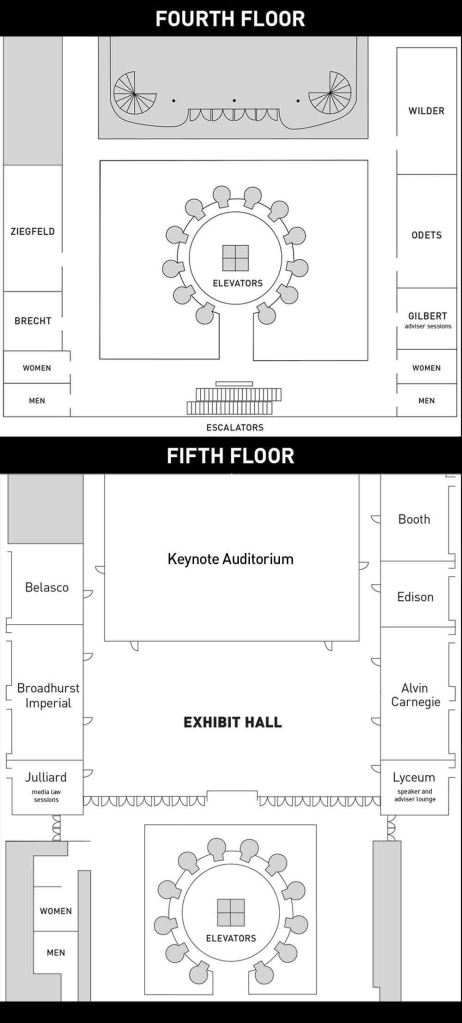
Floor maps
Your meeting room can be found on the master schedule. All sessions happen on the fourth and fifth floors of the Marriott Marquis…
Times
Each session begins on the hour and ends 50 minutes later…
- Transition: Those 10 minutes between sessions allow the previous speaker to pack up and you to set up. Please be mindful of your time and courteous to the next speaker.
- Arrival: Early is good. You can pick up your name badge at the Registration Desk in the fifth-floor Exhibit Hall.
- Afterward: Students will often ask you questions when you’re done. There are empty round tables outside the fifth-floor Exhibit Hall expressly for this purpose. So feel free to tell those students, “Let me make way for the next speaker, and we can meet at the tables outside.”
Room AV
Each room has a screen and projector with an HDMI hookup. And that’s all…
- No laptops are provided. Please bring your own. As you can imagine, when we provided laptops, they created more problems than they solved.
- Neither are audio speakers. The hotel charges us $50 for tinny 10-year-old desktop speakers. Even the smallest bluetooth speaker sounds better. So if you have your own, bring that instead.
- Bring your dongle, too. If your computer requires a device like this to hook up to an HDMI cable, please don’t forget it. We have a couple of spares, but they go fast because dongles are the Devil’s work.
- There are no microphones, either. The meeting rooms seat 40-80 and have good acoustics. We’ve been hosting conventions there for nearly two decades, and even the closest talkers have been heard in the back.
- There’s wifi, but only sorta. While we’ll have wifi on our two floors, it’s always slow with 700 college students on their phones. So we urge you to screenshot any web pages you need for your presentation. Otherwise, half your 50 minutes could be waiting for URLs to load.
Diversity, inclusion, accessibility
Please review CMA’s Diversity & Inclusion Code before presenting.
If you’re new at presenting or haven’t done so in a while, there’s a renewed emphasis on ensuring slide decks are accessible. If you use PowerPoint, Microsoft has both good advice and an Accessibility Tracker.
If you use Keynote, Apple sadly doesn’t offer something similar. But Canva does: Using Design Accessibility.
There’s equally good advice from a company called accessiBe, whose leadership is “an amazing group of individuals from different parts of the disability community.” Check out Slide into Inclusion with Accessible Presentation Decks.
If you have any questions or need any help, just email us at the address below.
Convention app
A week before the convention, we’ll load the master schedule into ProCon 25’s mobile app. We’ll notify you so you can set up your speaker profile. You can add a photo, bio, and social links.
Questions?
Email us or fill out this contact form. Oh, and did we say thanks for doing this?
 ProCon 25